/dev/sda คือ hdd ที่ทำงานปัจจุบัน ต้องการ clone ทั้งลูกไป /dev/sdb ซึ่งเป็น hdd ใหม่
เข้า single mode
#init 1
สั่ง clone
#dd if=/dev/sda of=/dev/sdb bs=512k &
แล้วรอ 1 ชมขึ้นไป
ขนาด hdd นั้น sdb ขาดไม่ควรต่ำกว่า sda
Tuesday, 11 August 2009


ห้าม User Logon พร้อมกันทีเดียว 2 เครื่อง
domain controller policy
.................................................
>computer configuration
>windows settings
>securiry settings
>local policies
>security options
Network access: Do not allow anonymous enumeration of SAM accounts>>>>เลือกให้เป็น enable
Network access: Do not allow anonymous enumeration of SAM accounts and share >>>> option ครับ
.................................................
>computer configuration
>windows settings
>securiry settings
>local policies
>security options
Network access: Do not allow anonymous enumeration of SAM accounts>>>>เลือกให้เป็น enable
Network access: Do not allow anonymous enumeration of SAM accounts and share >>>> option ครับ
ห้าม User ใช้ USB โดยใช้ Group Policy
- ดาวโหลดไฟล์ ADM จาก ลิ้งค์นี้ไปวางไว้ที่เซฟเวอร์ usb_removable_drives_adm
- ทำการแตกไฟล์ มีอยู่ 2 ไฟล์ คือ install.bat และ removable_storage.adm ดับเบิ้ลคลิกที่ไฟล์ install.bat เพื่อทำการคัดลอกไฟล์ ADM ไปยังที่เก็บ GPO

- ไปทำการสร้าง GPO ใหม่ โดยใช้อาจจะใช้ชื่อ “Disable USB drives” ก็ได้ แล้วทำการแก้ไข GPO

- ใน GPO คลิกขวาที่ Computer / Administrative Templates และเลือก “Add / remove templates”

- คลิกที่ Add เพื่อทำการเพิ่มไฟล์ ADM ที่เราคัดลอกไปใหม่ เลือก "Open" นำเข้ามายัง GPO
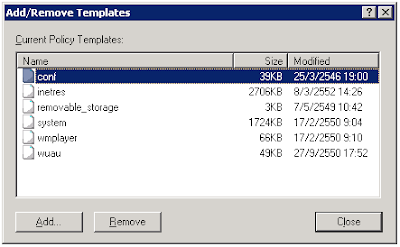

- ในหน้าต่าง GPMC คลิกที่ “View / Filtering” และเอาเครื่องหมายถูกที่ “Only show policy settings that can be fully managed” ออก

- คลิกที่ “Computer Settings / Administrative Templates / Custom Policy Settings / Restrict Drives” และทำการเปลี่ยนแปลงค่าใน “Disable USB Removable Drives” เป็น “Enabled Stopped”

- ก็เป็นอันเสร็จเรียบร้อย จากนั้นก็นำ GPO ที่เรานำเข้าไปบังคับใช้กับ Computer Group ที่เราต้องการ


Subscribe to:
Posts (Atom)