Wednesday, 19 August 2009

How to modify Node Type Windows

  1. For W2K/XP, go to HKEY_LOCAL_MACHINE\System\CurrentControlSet\Services\Netbt\Parameters to make change:Name: DhcpNodeType
    Value Type: REG_DWORD - Number
    Valid Range: 1,2,4,8 (b-node, p-node, m-node, h-node)
    Default: 1 or 8 based on the WINS server configuration

    If this key is present, it will override the DhcpNodeType key. If neither key is present, the system defaults to b-node if there are no WINS servers configured for the client. The system defaults to h-node if there is at least one WINS server configured.

  2. Windows 95, go to HKEY_LOCAL_MACHINE\System\CurrentControlSet\Services\VxD\MSTCP
    Name: NodeType
    Value type: DWORD
    Valid range: 1, 2, 4, or 8

    Default: 1 (b-node) if no value is specified or no WINS servers are configured on the network; 8 (h-node) if WINS servers are specified and NodeType is not otherwise defined in the Registry.

    If DNS is enabled (which also enabled LMHOSTS in Windows 95), name resolution will also follow the mode defined by this parameter. This value can also be configured using DHCP.
For details, see these Microsoft Knowledge Base articles:
Default Node Type for Microsoft Clients
http://support.microsoft.com/default.aspx?scid=kb;en-us;160177

เผลอไปปิด Account Administrator ทำอย่างไรจะให้ Active ได้

วิธีที่ 1
ไปที่ Start --->Run --->พิมพ์ secpol.msc --->OK
แล้วไปที่ Local Policies ---> Security Options --->Enable Account administrator

วิธีที่ 2
ใช้ Hiren 9.5 ในส่วน recovery tool =>Active Password Changer และจะมีค่า default เลือกให้ active administrator พร้อมทั้ง clear pass word

Monday, 17 August 2009

การ Map Drive ให้กับยูสเซอร์เพื่อเป็นพื้นที่ส่วนตัว (จะเข้าได้เฉพาะยูสเซอร์นั้นๆเท่านั้น)

การ Map Drive ของผู้ใช้เพื่อให้เป็นไดรฟ์ส่วนตัว ต้องทำที่โปรไฟล์ของแต่ละคน
โดยเข้าไปใน OU ที่ต้องการตั้งหากมียูสเซอร์จำนวนมากก็กดที่ชื่อคนแรกที่ต้องการทำแล้วไปคลิกชื่อคนสุดท้ายที่จะทำ
คลิกขวาเลือก Properties จากนั้นไปดูตรง Connect ให้เลือกเป็นไดรฟ์ที่ต้องการ Map Driver ให้
ตามตัวอย่างคือไดรฟ์ H ตรงช่อง To ใส่เป็น \\servername\userfolder\%username%
(ต้องใช้ %username% เพราะจะได้ค่าเท่ากับ Username ที่เราสร้างจะได้ไม่ต้องไปคีย์ชื่อเอง ซึ่งบางครั้งอาจจะไม่ตรง)

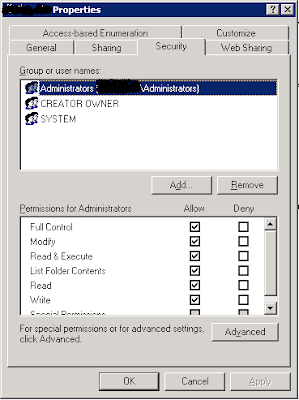
สำหรับ Userfolder เราจะให้สิทธิ์ดังนี้คือ
1. Permisson = Everyone เป็น Full
2. Securites = เอาอันอื่นออกหมด ให้เหลือแต่ System, Create Owner\ Adminstrator

Map Driver Home Use

Map Driver Home Use

สำหรับการใช้ netuse นั้นใช้เพื่อ Map Drive ที่เป็นส่วนรวม เช่น ไดร์ฟแผนก / ฝ่าย แล้วค่อยมากำหนดสิทธิ์การเข้าถึงเป็นแผนกหรือฝ่ายนั้นๆ
โดยเขียนเป็นสคริปไฟล์มาวางไว้ที่ \\servername\NETLOGON แล้วจึงนำชื่อสคริปต์มาใส่ช่อง Logon Script

net use S: \\servername\accountdept ไดรฟ์ส่วนรวมสำหรับแผนกบัญชีไว้แชร์งานระหว่างแผนก
net use W: \\servername\allcompany ไดร์ฟส่วนรวมทั้งบริษัทไว้แชร์งานระหว่างบริษัท
net use Z: \\servername\accountdata (สำหรับ Map Drive ให้กับพนักงานแผนกบัญชีเท่านนั้น แผนกอื่นไม่ได้ใส่ไว้ให้ เพื่อใช้งานโปรแกรม Express โดย Map เป็นไดร์ Z: และทำการคัดลอก Shotcut มาโดยใช้คำสั่งที่วางไว้ในสคริปต์ไฟล์ดังต่อไปนี้
@copy \\servername\accountdata \ExpressA.lnk "%UserProfile%\Desktop\ExpressA.lnk"