- Create URL Set.
(follow picture 001)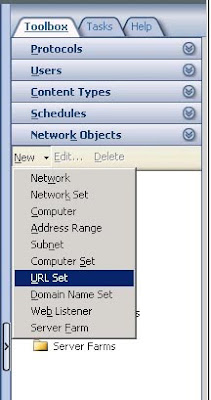
- Fix Name for URL set and click Add button for add URL with you want to deny.
(follow picture 002)
- go to your Firewall Policy choose Properties > click tab To > click Add button in Exceptions zone and choose your URL set.(follow picture 003)

- Apply this rule.
Monday, 10 August 2009
BlockWeb บางเว็บโดยใช้ ISA 2006


Sunday, 9 August 2009
การแบ่ง Partition ใน Vmware Workstation?
ผมใช้ Vmware Workstation 6 Os.Window Server 2003 R2
แบ่ง C: 7 GB , D:18 GB
เมื่อผมลงโปรแกรมเฉพาะทางเกิดการ Require partition drive C: 10 GB
ตอนแรกกะจะ Install ใน D: แต่เกรงว่าระบบจะไม่เสถียร จึงอยากจะแบ่ง D: ไปรวมกับ C:
ลองใช้ Partition magic แบ่งแต่ก็ไม่ได้ผลฟ้อง error ว่าไม่สามารถใช่ร่วมกับ Win20003 ได้
ในการแบ่ง Partitions สำหรับ Vmware Workstation ให้ใช้โปรแกรม EASEUS Partition Master Server
แบ่ง C: 7 GB , D:18 GB
เมื่อผมลงโปรแกรมเฉพาะทางเกิดการ Require partition drive C: 10 GB
ตอนแรกกะจะ Install ใน D: แต่เกรงว่าระบบจะไม่เสถียร จึงอยากจะแบ่ง D: ไปรวมกับ C:
ลองใช้ Partition magic แบ่งแต่ก็ไม่ได้ผลฟ้อง error ว่าไม่สามารถใช่ร่วมกับ Win20003 ได้
ในการแบ่ง Partitions สำหรับ Vmware Workstation ให้ใช้โปรแกรม EASEUS Partition Master Server
Thursday, 6 August 2009
วิธีการปิด Autoplay ในระดับโดเมนของ Windows Server 2003
ให้เข้าไปที่ Start -> Run -> พิมพ์ Gpedit.msc คลิ๊ก OK
ไปเลือกที่ Computer Configuration จะมีรายการด้านขวา เลือกที่ Administrative Templates
แล้วไปเลือกที่ Turn off Autoplay เลือก Properties แล้วเลือกเป็น Enable เลือก All Drives ถ้าต้องการปิดทั้งหมด
พิมพ์ gpupdate /force เพื่อให้ GPO มีผลทันที
ไปเลือกที่ Computer Configuration จะมีรายการด้านขวา เลือกที่ Administrative Templates
แล้วไปเลือกที่ Turn off Autoplay เลือก Properties แล้วเลือกเป็น Enable เลือก All Drives ถ้าต้องการปิดทั้งหมด
พิมพ์ gpupdate /force เพื่อให้ GPO มีผลทันที
Subscribe to:
Posts (Atom)